
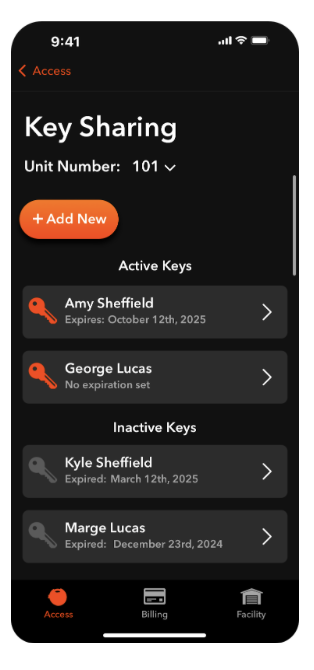
From the Access tab, you can press Share Key to navigate to the Key Sharing screen. Here, you can send virtual keys to anyone who might need to access your unit.
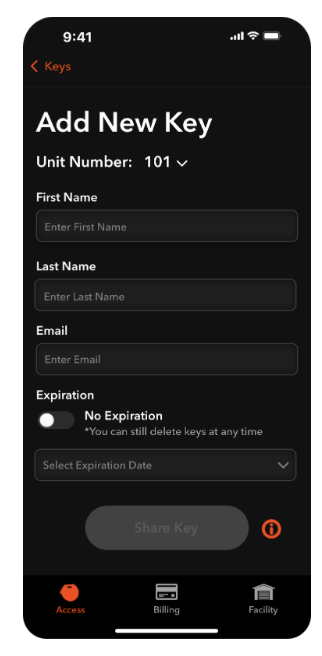
Share a key for your unit by pressing Add New. If you have multiple units, press the unit number dropdown to ensure you are sharing a key for the desired unit. If you wish to share a key for multiple units, you'll need to add a new key for each unit separately.
Type in the shared user's first and last name, and email address where the key invitation will be sent. If you wish to share the key indefinitely, toggle No Expiration to ON. If you wish to have the key automatically expire on a certain date, toggle No Expiration to OFF and select an expiration date. Shared keys can be updated or deleted at any time, regardless of your selection.
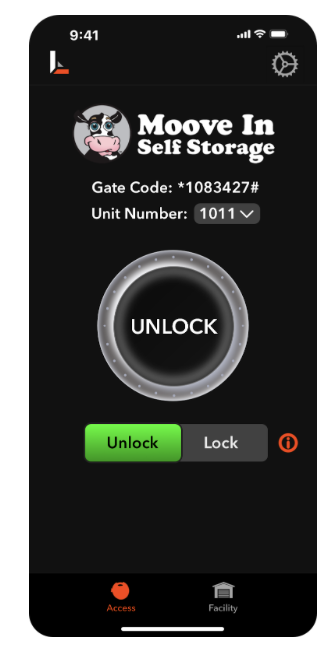
Upon pressing the Share Key button, the shared user will be sent an email to download the app, and must sign in using the same email address you entered for them. After signing in, they will be able to view your gate code and unit number, operate the lock, and see facility details. Shared users will not have access to the billing tab, will not be able to share additional keys, and cannot initiate a move out on your behalf.
From the Key Sharing Screen, you can also see all active and inactive shared keys for the selected unit. To view and manage shared keys for different units, press the unit number dropdown at the top.
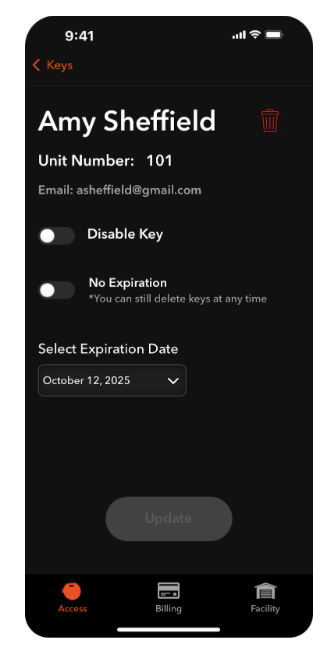
To manage a shared key, click on the card for the key you want to manage. Note that all changes made on this screen only pertain to that user's key for the specific unit displayed, and do not affect shared keys for other units that may exist.
To delete the key entirely, press the red trash can icon at the top right. If you delete a key and want to re-share it, you must add a new key again. Toggling Disable Key will disable that key indefinitely and move it to Inactive Keys, allowing you to go back and reinstate that key in the future. You can also add, remove, or update expiration dates for existing keys. After you've made changes, press Update to submit them.